Word Blocks
Introduction
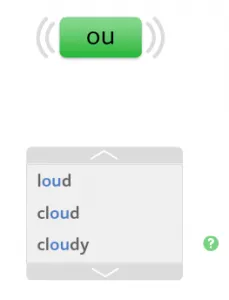
Students are usually able to read the words in the word blocks as they are set within a secure audio / visual framework, and we tell them the new unit of sound.
- When the page opens an introductory message is played automatically giving the unit of sound on that screen.
- The student repeats the sound aloud.
- The message can be replayed by clicking on the Reading icon.
Explore
- The 1 pencil Explore stage is where the students make use of the support elements before reading the words.
- Click on the unit of sound to hear it again and to see the pattern highlighted in the word block.
- Words not conforming to the exact sound are not highlighted.
- Words of more than one syllable appear with a question mark beside them in the Explore phase.
- Click on a question mark to hear and see the word broken down into syllables.
Practice
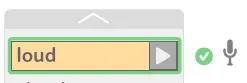
- Click on the arrow to activate the block.
- Recording is now active (demonstrated by the appearance of a microphone) – this is now the 2 pencil Practice stage.
- The first word in the block is highlighted for 2 seconds.
- The student reads the word aloud into the microphone while it is highlighted.
- After 2 seconds the word is read by the program voice.
- The activity box moves to the next word and the process is repeated until all the words in the block have been read.
Checking & Feedback
- Click on the Playback icon to hear the student’s voice followed by the program voice for each word in turn. Alternatively, click on the tick for individual word feedback.
- Rerecord any word that was wrong by clicking on the activity box arrow.
- Students should be actively engaged in this process, noticing their own mistakes and self-correcting.
- The tutor can play back the students’ recordings from Records if needed. This means the tutor does not need to test or sit near the student during sessions.
- The last three pages of recordings are stored.
Completion
- Click on the arrow at the bottom of the activity box to go onto the next set of Word Blocks.
- When all the stars are filled in, click for the next activity in the usual way.
- When there is more than one unit of sound on the same page, the introductory message will automatically play when the student clicks through to the next activity.
- These routines are repeated on every Reading page and soon become familiar.